TL;DR and Key Takeaways
No single LLM is best at everything, GPT excels at research, Claude Sonnet at reasoning and coding, Gemini at speed and multimodal tasks.
Even within one family (e.g., Claude Sonnet vs. Haiku), models vary dramatically in speed, cost, and capability.
The best teams use multiple models strategically: fast models for drafts, powerful models for complex analysis, cost-effective models for repetitive high-volume tasks.
Rather than committing to one vendor, an LLM-agnostic approach (using multiple models strategically) reduces risk, optimizes outputs and costs, and ensures you always have access to the best tool for each specific job.
Workstation makes it simple to compare LLMs, easily switch between them, optimize for performance, all with greater security and full collaboration.
Why one LLM isn't Enough Anymore
The AI landscape moves fast. A model that leads benchmarks today might be surpassed next quarter. Pricing changes. Features shift. Outages happen. (Remember the ChatGPT outage in January 2025 that took down GPT-4, 4o, and mini models simultaneously?) Different LLMs have different strengths. Locking into one provider limits your work because:
You miss out on models better suited for specific tasks
You're vulnerable to pricing changes and service disruptions
Models have personality, while users have familiarity and preferences
You lose negotiating leverage and flexibility
The smarter approach? Be LLM-agnostic. Use the best model for each job, switch when better options emerge, and build knowledge & workflows that aren't held hostage by a single vendor.
The big three: GPT-4, Claude, and Gemini compared
Let's break down how the major players stack up across key dimensions.
OpenAI’s GPT
Best for: Creative content, brainstorming, general-purpose tasks, and conversational AI.
Strengths:
Excellent at generating creative, human-like text
Strong multimodal capabilities (text, image, audio)
Fast response times with GPT (131 tokens/second)
Massive ecosystem and integrations
Weaknesses:
More expensive than competitors for high-volume use
Can be verbose; sometimes prioritizes style over precision
Data retention policies require opt-out
When to use it: First drafts, marketing copy, customer-facing content, ideation sessions.
Anthropic Claude (Sonnet & Opus)
Best for: Complex reasoning, code generation, long-context analysis, and tasks requiring precision.
Strengths:
Superior performance on coding benchmarks (Claude 3.5 Sonnet: 93.7% on HumanEval)
Excellent at multi-step reasoning and logical tasks
Strong safety and ethical guardrails
Weaknesses:
Slightly slower initial response time than Haiku or GPT
When to use it: Technical documentation, code reviews, financial analysis, legal document synthesis, research summaries.
Google Gemini
Best for: Speed, multimodal processing, and high-volume tasks.
Strengths:
Extremely fast
Native multimodal (text, image, audio, video)
1-million-token context window across all models
Tight integration with Google ecosystem (Search, Workspace)
Weaknesses:
Slightly behind GPT-4 and Claude on complex reasoning benchmarks
Less established in enterprise compared to OpenAI
When to use it: Real-time applications, high-volume data extraction, quick Q&A, multimodal tasks involving video or images.
Comparing LLMs in the Same Family
Even within the same LLM family, models are optimized for different use cases. Treating ChatGPT 4o, 5, and 5.1 as “basically the same” leaves performance and control on the table, especially if you’re building repeatable workflows.
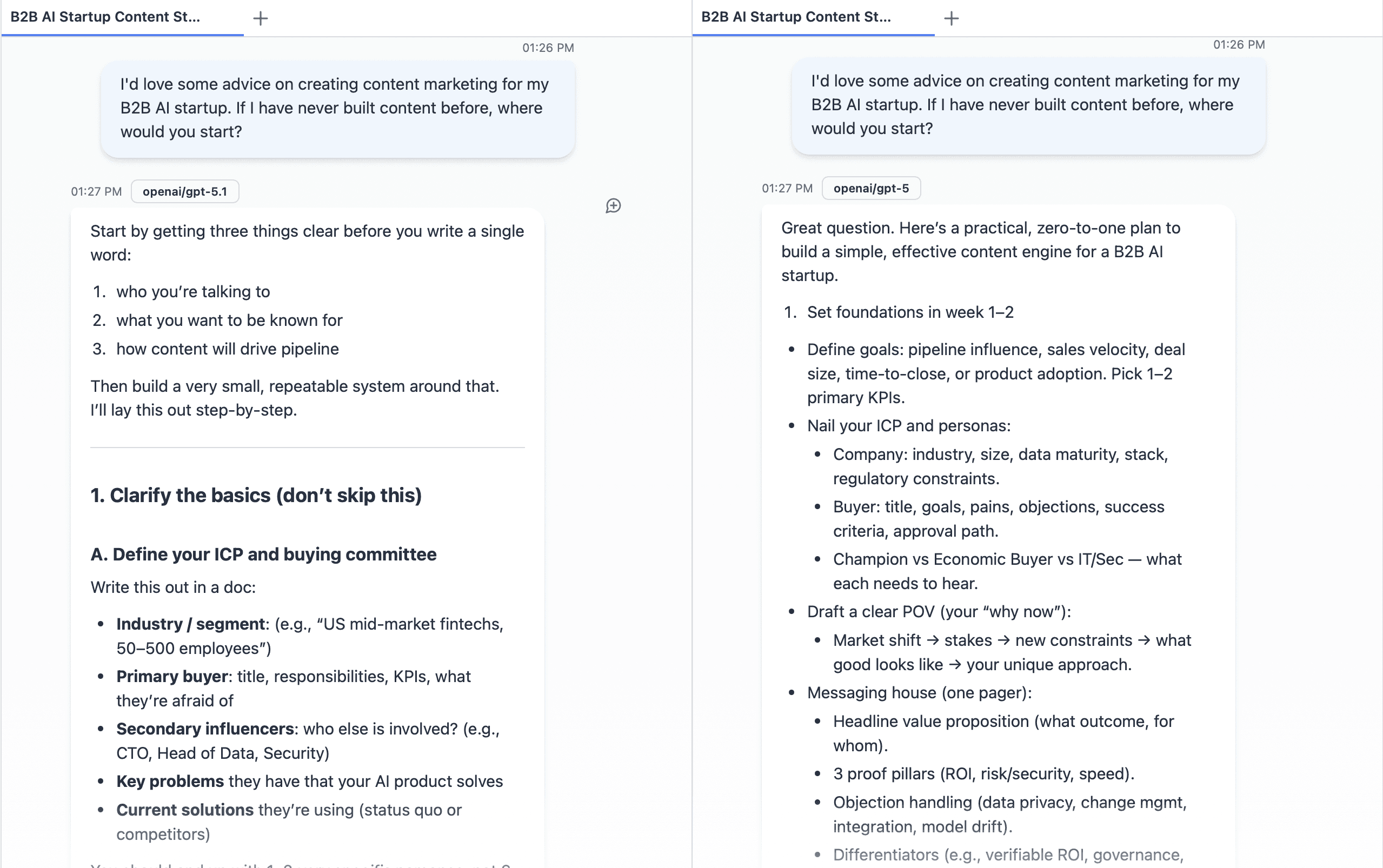
ChatGPT 5.1 vs 5
ChatGPT 5.1: A refinement of GPT‑5 focused on control, consistency, and human‑like interaction.
What Changed:
Better control and instruction following
More reliable with word limits, formats, and style constraints
Fewer “I know you said 5 bullets, here are 8” moments
Clearer, more organized reasoning chains in explanations
Adaptive reasoning and dual modes
Two main variants: GPT‑5.1 Instant (speed) and GPT‑5.1 Thinking (deeper reasoning)
Adaptive reasoning: it spends more time on hard questions and less on simple ones
“Thinking Mode” slows down slightly to give more thorough, step‑by‑step answers, useful for complex topics, long‑form writing, or analysis
Tone, speed, and privacy refinements
TechRadar and others found 5.1 noticeably more responsive and more pleasant/“human” in conversation than 5
5.1 can handle much longer prompts, making it better for full research papers or long-running chats
Introduces Private Compute Mode, where some reasoning happens locally, keeping more sensitive data off OpenAI’s servers (subject to how it’s configured in your setup)
Strengths (vs GPT‑5):
More consistent, less “wobbly” on repeated runs of the same task
Better at following detailed instructions and strict formats
Explanations feel clearer and more approachable, not just “more tokens”
Flexible: Instant for everyday use, Thinking when you need depth
The hidden cost of vendor lock-in
Committing to a single LLM provider creates risks most teams don't consider until it's too late. LLM-agnostic teams avoid these traps. They can switch models in hours, not months, and always have a backup plan.
Risk | Impact |
|---|---|
Pricing changes | OpenAI raised API prices 30% in 2023; locked-in teams had no alternative. |
Service outages | January 2025 ChatGPT outage affected all GPT models; teams with backups kept working. |
Model deprecation | Providers retire models with little notice; migration is costly and disruptive. |
Feature gaps | One model may lack capabilities (e.g., vision, long context) you need for certain tasks. |
Compliance issues | Data residency or regulatory requirements may force you to switch providers. |
How to choose the right LLM for your task
Stop asking "Which LLM is best?" and start asking "Which LLM is best for this specific task?"
Decision framework
Task Type | Recommended Model | Why |
|---|---|---|
Creative writing, marketing copy | GPT | Natural, engaging tone; great for customer-facing content |
Code generation, debugging | Claude 3.5 Sonnet | Highest coding benchmarks; precise and reliable |
Long document analysis | Claude Opus or Gemini Pro | 200K–1M token context windows handle entire reports |
Real-time chatbots | Claude Haiku or Gemini Flash | Fast response, low cost, good-enough accuracy |
Multimodal (image/video analysis) | Gemini or GPT | Native multimodal processing |
High-volume data extraction | Gemini Flash-8B or Claude Haiku | Extremely low cost per token; fast throughput |
Complex reasoning, research | Claude Sonnet or GPT-4o | Strong logic, multi-step problem-solving |
Cost optimization strategy
Tier your work: Use cheap models (Haiku, Gemini Flash) for drafts and iterations; upgrade to premium models for final output.
Batch processing: Run high-volume tasks through cost-effective models; save expensive models for one-off complex queries.
Prompt caching: Claude offers up to 90% cost savings with prompt caching for repeated queries.
Building an LLM-agnostic workflow
Being LLM-agnostic doesn't mean using every model for everything. It means having the flexibility to choose and switch without friction.
How to get started
Audit your tasks: List your top 5–10 AI use cases and their requirements (speed, cost, accuracy, context length).
Map models to tasks: Assign a primary and backup model for each use case based on the decision framework above.
Use a unified interface: Instead of managing multiple APIs manually, use a platform such as Workstation that abstracts model selection
Test and iterate: Run the same prompt across multiple models; compare output quality, speed, and cost.
Monitor and optimize: Track usage, costs, and performance; adjust model selection as new options emerge.
Example: A content team's multi-model workflow
Ideation & outlines: GPT (creative, fast)
First draft: Claude Haiku (cheap, good enough)
Technical sections: Claude Sonnet (precise, detail-oriented)
Final polish: GPT-4o (engaging tone)
SEO metadata: Gemini Flash (fast, low-cost)
Result: 60% cost savings vs. using GPT for everything, with better output quality where it matters.
The future is multi-model
AI is evolving too fast to bet on one horse. New models drop every quarter. Pricing shifts. Capabilities leap forward. The teams that win are the ones that stay flexible.
An LLM-agnostic approach isn't just smart, it's essential. It protects you from disruption, optimizes your spend, and ensures you're always using the best tool for the job.
If you're looking for a way to manage multiple models without the complexity, platforms like Workstation make it simple to switch between LLMs, optimize for cost and performance, and keep your workflows running smoothly, no matter what changes in the AI landscape.
Frequently Asked Questions
Q: Isn't managing multiple LLMs more complicated?
A: Not if you use the right tools. Platforms with LLM-agnostic architectures (like Workstation) let you switch models with a single line of code. The upfront setup is minimal compared to the long-term flexibility and cost savings.
Q: Should I still use ChatGPT if I'm going multi-model?
A: Absolutely. ChatGPT is excellent for creative tasks, brainstorming, and general use. Just don't use it for everything, save it for tasks where its strengths shine, and use cheaper or more specialized models elsewhere.
Q: How do I know which model is actually best for my use case?
A: Test. Run the same prompt through 2–3 models and compare results. Look at output quality, speed, and cost. Most teams find that 80% of tasks can use mid-tier models, with only 20% needing premium options.
Q: What if a model I rely on gets deprecated?
A: This is exactly why LLM-agnosticism matters. If your workflows are tied to a single model, deprecation is a crisis. If you've built flexibility in from the start, you can switch to an alternative in hours, not months.

Workstation
Team


" width="25.9203px"><path d="M 0 0 L 5.94 0 L 10.98 18 L 5.04 18 Z" fill="rgb(10, 1, 79)" height="18.000034px" id="gKlycu6zY" transform="translate(0 0)" width="10.98px"/><path d="M 0 0 L 5.94 0 L 10.98 18 L 5.04 18 Z" fill="rgb(10, 1, 79)" height="18.000034px" id="rbgDUHp_j" transform="translate(10.08 0)" width="10.979999999999997px"/><path d="M 10.98 0 L 5.04 0 L 0 18 L 5.94 18 Z" fill="rgba(10, 1, 79, 0.4)" height="18.000034px" id="rdjjInXYn" transform="translate(5.041 0)" width="10.979989999999999px"/><path d="M 7.884 0 L 5.878 7.2 L 0 7.2 L 1.971 0 Z" fill="rgba(10, 1, 79, 0.4)" height="7.200004px" id="LQCpPwtfH" transform="translate(18.036 0)" width="7.8842px"/></g></svg>)