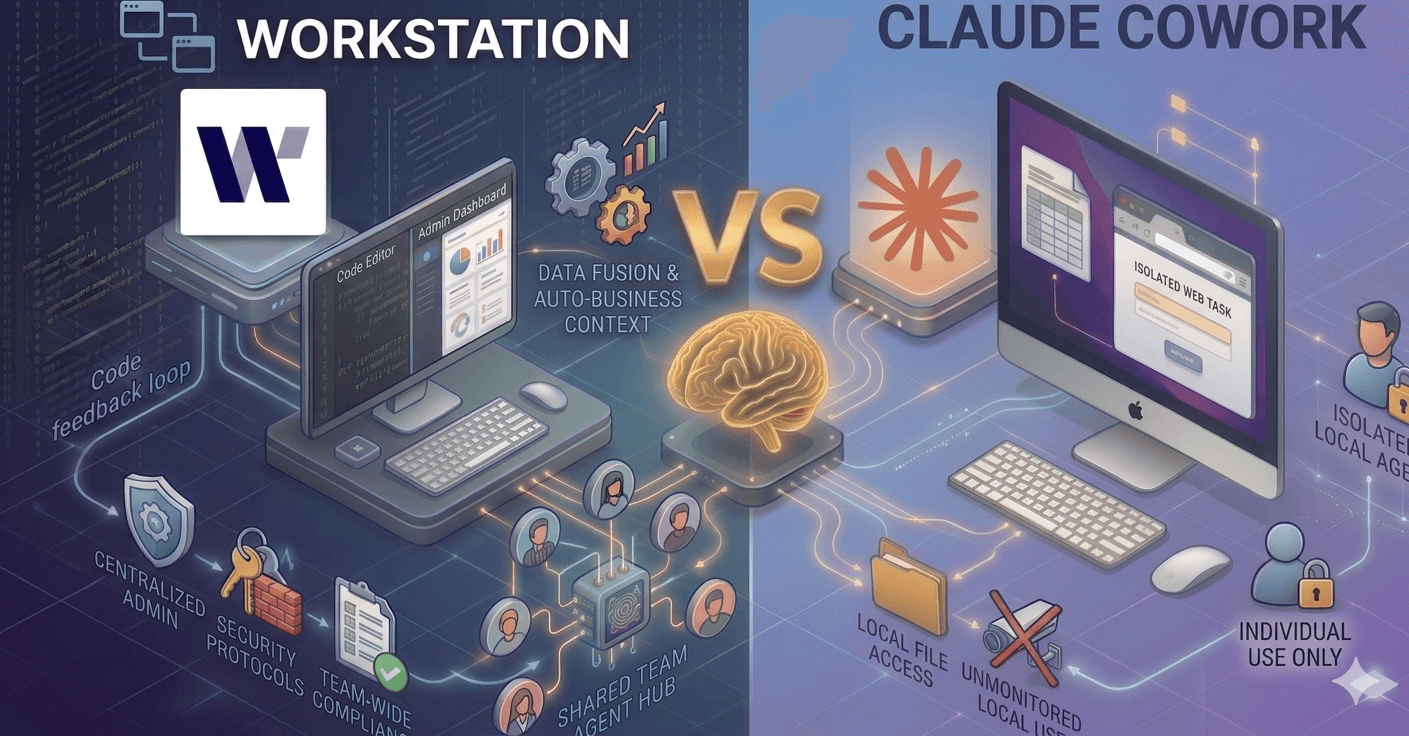
Workstation vs Claude Cowork: What Actually Matters When Choosing an AI Platform for Your Enterprise
Claude Cowork is a great personal AI tool. For a single user who wants local execution, macOS integration, and browser automation on their desktop, it's a perfect fit.
But most companies don't need an army of employees running loose with their own personal assistants. They need a platform that passes procurement, scales across departments, creates leverage, and gets smarter as the organization uses it.
That's an entirely different product, and the two are further apart than most people realize.
TL;DR
Claude Cowork is a powerful personal AI assistant built for individual users on macOS and Windows
Workstation is an enterprise AI platform built for teams, with security, collaboration, and data integration as foundational layers
Across 34 compared capabilities, Workstation leads on 23. Cowork leads on 4. Seven are at parity.
Product architecture is the real differentiator, not feature counts. Workstation can add individual productivity features on top of an enterprise foundation. Cowork requires an army of FDEs to add enterprise infrastructure.
How enterprises actually evaluate AI platforms
Features get all the attention in these comparisons, but enterprises don't actually buy features. They buy platforms that clear three gates, in order:
Security, compliance, and enterprise control. Can we even deploy this at scale? Or are we quietly turning every employee's laptop into an unmonitored AI surface?
Collaboration and workflows. Can our team use this together (without, say, teaching marketers to use GitHub just to share prompts)? Does it compound leverage for our organization?
Data integration and intelligence. Can we use our data reliably and consistently to make the AI smarter? Do I need to kick off a separate data project just to enable the platform?
If a product fails the first gate, the other two don't matter. This is how procurement, IT, and leadership actually make decisions.
Let's walk through each layer.
At-a-glance comparison
Workstation | Claude Cowork | |
|---|---|---|
Built for | Teams and enterprises | Individual users |
Platform | Web + Desktop | macOS / Windows |
Execution | Cloud-based with deployment flexibility | Local Linux VM on Apple silicon |
Models supported | OpenAI, Gemini, Claude, Ollama, private models | Anthropic only |
Deployment options | SaaS, on-prem, private cloud, air-gapped | Local computer |
Multi-user collaboration | Real-time with user presence, branching, comments | Single-user only |
Audit logs | Fully captured, as configured by enterprise | Explicitly not captured for Cowork activity |
Regulated workloads (HIPAA/FedRAMP) | Ready architecture for VPC or on-prem deployment | Explicitly unsupported |
Session memory | Persistent history with search | Ephemeral; no cross-session memory |
Data layer | Semantic layer with lineage, versioning, shared memory | No equivalent |
Browser automation | Native Chrome integration | Native Chrome integration |
Local filesystem access | Cloud-synced | Direct read/write to local folders |
Plugin ecosystem | Custom agents, no public marketplace | Growing community marketplace |
Status | Production, Enterprise Support | Research preview |
Gate 1: Security, compliance, and enterprise control
For any serious buyer, this is where the conversation lands. If data isn't safe, the rest of the evaluation doesn't happen.
Where Cowork falls short
Anthropic's own documentation is blunt:
"Do not enable Cowork for HIPAA, FedRAMP, or FSI regulated workloads."
And separately:
"Cowork activity is NOT captured in Audit Logs, Compliance API, or Data Exports."
That's the vendor telling you: this product is not built for compliance, and there's no audit trail for what happens inside it. With direct engineering support from Anthropic, you can now integrate Cowork into your SIEM, however this is not an "out of the box" feature that can just be enabled.
Beyond those explicit disclaimers, Cowork out of the box lacks PII filtering, multi-tenant isolation, role-based access control, centralized admin configuration, and flexible private deployment options. It runs on macOS or Windows only with no cross-device sync. And it locks you into Claude as your company’s only model.
For any organization in financial services, healthcare, or government, concerned about information leakage, or with data sovereignty requirements, this disqualifies Cowork before the feature conversation even begins.
What Workstation delivers
Workstation was built for enterprise from day one:
Full audit logging and compliance with programmatic access to all usage data
Automatic PII detection and redaction before data reaches any model
Row-level security and granular RBAC with centralized user management (with an option to integrate into an IdP)
Model agnosticism: Anthropic, OpenAI, Grok, Google, Ollama, or private models. No vendor lock-in.
Flexible deployment: SaaS, on-prem, private cloud (Azure/AWS/GCP), or air-gapped environments
Cross-platform: browser and desktop across Windows, Mac, and Linux with real-time sync
HIPAA and FedRAMP-ready architecture for regulated workloads
Cowork's single advantage in this layer is local sandbox execution, where work runs entirely on the user's machine. That's a meaningful privacy feature for individuals. But it's the opposite of what enterprise buyers need. Enterprise control requires centralized governance, not distributed local sandboxes with unmonitored access to a user’s machine.
Gate 2: Collaboration, agentic workflows, and supporting capabilities
Once security clears, the next question is always: "Can my team use this together?"
This is where the two products diverge most sharply.
Collaboration: Workstation sweeps the comparison
Cowork is a single-user experience with no workaround. You can't share sessions with teammates, branch conversations, leave threaded comments, or access work from another device. Every session is yours alone.
Thus the things you do with Cowork are not shared. Do you want to install github on all your marketing team’s computers to manage skill revisions?
Workstation treats collaboration and sharing as a core function:
Real-time multi-user editing with typing indicators and presence
Shareable sessions so teammates can pick up where others left off
Conversation branching to explore alternative paths without losing context
Threaded comments for inline review and feedback
Team-shared agents with reusable configurations
Shared connectors with individual or workspace-level access
Persistent conversation history with full search
Cross-device sync across web, mobile and desktop
A marketing lead can build a workflow, share it with the content team, receive comments, branch into variations, and iterate, all without leaving the platform. That's not possible in Cowork, and it's not a matter of a missing feature. The architecture doesn't support it.
Agentic workflows: Both platforms deliver
Both products handle the core agent harness well. Sub-agent spawning, custom agent selection, progress tracking, status streaming, and async loops are at parity. Both can decompose tasks, run sub-agents, and manage complex workflows.
The difference is context. Agents running in isolation hit a ceiling. When those same agents run inside collaborative, governed workflows with shared knowledge and team context, the value compounds across every person using them.
Supporting capabilities: Cowork has edges
Cowork does have real advantages for individual productivity:
Local code execution with direct read/write to mounted folders; Workstation supports this in a sandboxed cloud environment which we believe is better
A growing plugin ecosystem with community contributions; Workstation has the ability to support external plugins subject to enterprise approval
These are genuinely useful for generalist, individual users. But there's an important distinction: Workstation wraps everything in its enterprise foundation. Adding enterprise infrastructure to Cowork, things like real-time collaboration, shared context, and persistent memory, would require an army of forward-deployed engineers rearchitecting the product from the ground up. This may be an option if you are a F100 company, but not everyone needs a dedicated engineering team maintaining employee software.
Gate 3: Data connectors, integrations, and the Data Fusion layer
Most enterprise AI projects don't fail because the model wasn't smart enough. They fail because the data wasn't ready:
60% of AI projects will be abandoned due to a lack of AI-ready data (Gartner)
63% of organizations say they don't have the data practices in place to support AI
$3.1 trillion is the annual cost of bad data to the economy (IBM)
The reason is structural. The typical enterprise has dozens of fragmented data sources spread across warehouses, SaaS tools, mainframes, and file shares. The traditional fix is "The Data Project," a multi-year initiative that tends to languish while the AI roadmap waits on it.
But the answer to 37 fragmented data sources isn't creating a 38th copy of your data.
Cowork: Strong on personal files, blind to the enterprise
Cowork handles local files well. It can natively process an impressive range of formats: .docx, .pdf, .xlsx, .pptx, .csv, .json, .md, images, code files, and Jupyter notebooks. Workstation offers Google Apps-style spreadsheets & docs, and supports PDFs, .md, and most other forms.
But beyond file access, Cowork offers no semantic data layer, no artifact versioning, no data lineage tracking, no shared prompt library, and no team-wide memory. Every session starts from zero, and nothing it learns reaches the systems where your business actually lives.
Workstation: Batteries-included for messy enterprise data
Workstation is built out-of-the-box to work with your data as it actually exists – fragmented, inconsistent, and spread across old and new systems alike. It combines traditional data engineering with generative AI to deliver AI-ready unified data in days, not months. No migration, no new warehouse, no data project.
At the core is the Virtual Data Fusion Layer. You connect your existing sources, and agents start querying across them immediately, with no ETL.
Layered on top of the fusion layer:
Semantic understanding. Agents reconcile conflicting definitions across systems. (Aligning the meaning of "customer" between Salesforce and NetSuite; Workstation figures it out.)
Structured and unstructured data. Join a Snowflake table to a PDF contract to a Slack thread in one query.
Lineage and governance. Every response shows its sources, with full audit trails that satisfy compliance.
Quality and anomaly detection. Score data quality inline and surface outliers before they reach an exec report.
Enterprise data connectors: Notion, Slack, Google Drive, GitHub, Jira, Microsoft Teams, SharePoint, OneDrive, Linear
Workstation brings business context to the data you already have. Instead of waiting for The Data Project to finish, your team builds agents that understand your ARR, your customer definition, your fiscal Q3, at both an organizational level but more importantly at a team level where different perspectives can occur.
Knowledge compounds across sessions and teams, and every new connector adds to the shared intelligence.
The asymmetry that defines the landscape
Across 34 compared capabilities:
Layer | Workstation leads | Cowork leads | Parity |
|---|---|---|---|
Security, Compliance, Enterprise Control | 11 | 1 | 0 |
Collaboration, Workflows, Supporting | 7 | 2 | 6 |
Data, Integrations, Semantic Layer | 5 | 1 | 1 |
Total | 23 | 4 | 7 |
But the numbers alone don't tell the full story. Where each product leads matters more than how many boxes it checks.
Cowork's 6 advantages are concentrated in personal productivity: local filesystem access, browser automation, macOS integration, and a plugin ecosystem. These are valuable for individual users.
Workstation's 23 advantages span all three layers and concentrate in areas that are architecturally difficult to retrofit: multi-tenancy, compliance infrastructure, real-time collaboration, and semantic understanding of enterprise data.
This creates a structural asymmetry:
Workstation can add local execution features (browser automation, filesystem access, plugins). These are engineering projects that build on an existing enterprise foundation.
Cowork cannot easily add enterprise infrastructure (multi-tenancy, real-time collaboration, compliance frameworks, semantic data layers). These require architectural changes that go far deeper than feature additions.
It's easier to build personal features on an enterprise foundation than to build enterprise capabilities on a personal tool.
The bottom line: Personal assistant vs enterprise platform
Claude Cowork is a powerful tool for individual users. If you're a solo operator who wants deep local AI execution on macOS, it's a great option. The issue is that it's a personal product, and most enterprises need something built for teams.
Enterprises need platforms that:
Pass security reviews with audit trails, compliance APIs, and regulatory readiness
Scale across teams with real-time collaboration and shared workflows
Build organizational intelligence through semantic data layers and persistent memory
Support model choice without vendor lock-in
Deploy flexibly across cloud, on-prem, and private environments
Workstation was built for this from the ground up. Not because enterprise features were layered on top of a personal tool, but because enterprise was the foundation from day one.
Your team needs more than a personal assistant. Workstation gives you the reasoning power of the best general AI models with enterprise-grade security, real-time collaboration, and a semantic data layer that makes AI smarter as your team uses it.
FAQ
Is Claude Cowork a competitor to Workstation?
They serve different needs. Cowork is a personal AI assistant optimized for individual productivity on macOS. Workstation is an enterprise AI platform built for teams, with security, collaboration, and data integration at its core. They overlap in AI capability but diverge significantly in architecture and target use case.
Can Claude Cowork be used in regulated or sensitive industries?
No. Anthropic's own documentation explicitly states: "Do not enable Cowork for HIPAA, FedRAMP, or FSI regulated workloads." Cowork activity is also not captured in audit logs or compliance APIs. Workstation can be deployed within your VPC, giving you verifiable, full control over usage and data egress.
Does Workstation support Claude as a model?
Yes. Workstation is model-agnostic. You can use Claude, GPT, Gemini, Ollama, or private models. You're never locked into a single vendor, and you can choose the best model for each task.
What's the difference between a personal AI tool and an enterprise AI platform?
A personal AI tool is designed for one user. An enterprise AI platform adds security controls, team collaboration, data integration, audit trails, and governance. Think of it like the difference between a notes app and a full project management platform.
Can I use Workstation if I'm an individual or small team?
Absolutely. Workstation scales from individual users to enterprise teams, especially as an individual if you have to work with external partners, contractors, or clients. You get the same powerful AI capabilities whether you're a solo operator or part of a large organization, with security and collaboration built in from the start.

Workstation
Team


" width="25.9203px"><path d="M 0 0 L 5.94 0 L 10.98 18 L 5.04 18 Z" fill="rgb(10, 1, 79)" height="18.000034px" id="gKlycu6zY" transform="translate(0 0)" width="10.98px"/><path d="M 0 0 L 5.94 0 L 10.98 18 L 5.04 18 Z" fill="rgb(10, 1, 79)" height="18.000034px" id="rbgDUHp_j" transform="translate(10.08 0)" width="10.979999999999997px"/><path d="M 10.98 0 L 5.04 0 L 0 18 L 5.94 18 Z" fill="rgba(10, 1, 79, 0.4)" height="18.000034px" id="rdjjInXYn" transform="translate(5.041 0)" width="10.979989999999999px"/><path d="M 7.884 0 L 5.878 7.2 L 0 7.2 L 1.971 0 Z" fill="rgba(10, 1, 79, 0.4)" height="7.200004px" id="LQCpPwtfH" transform="translate(18.036 0)" width="7.8842px"/></g></svg>)